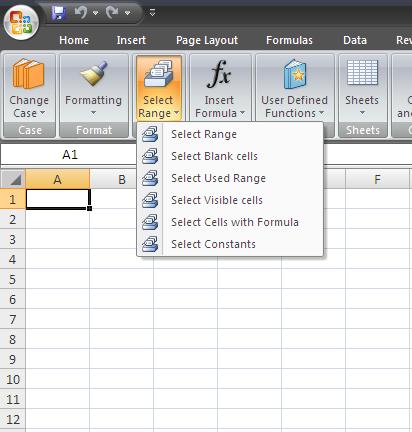
a) Select Range - If you want to select the range like "a1:d50" . Click on select range - it will show a message box and type a1:d5 ( Note do not use dollar signs or double quotes) simply type like a1:a10 or z1:ad50 ,etc. Snapshot below-

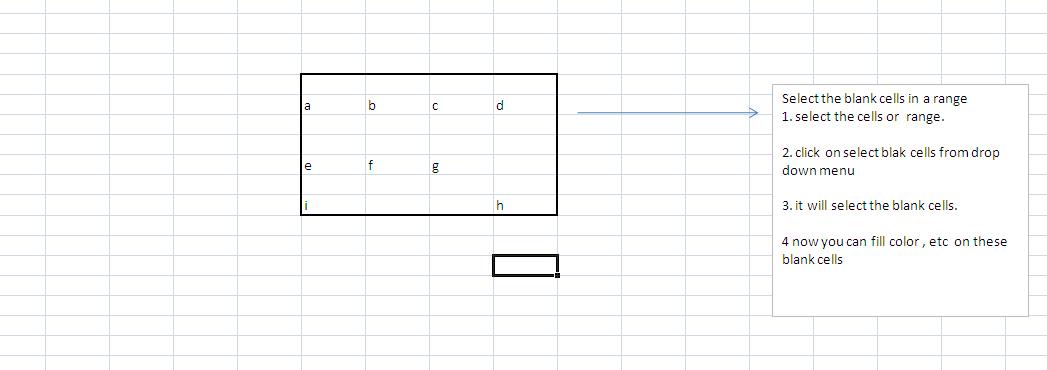
B) select Blank Cell- it will select the blank cells in the selected area. Snapshot below-
c) Select Used Range - It will select the used range in the active sheet.
d) Select Visible Cells - It will select all the visible cells in the selected area.
e) Select Cells with Formula - It will select all the cells with formula in the selected area or range
d) Select Constants - It Will select all cells with data in the selected area or range (Ignore all cells with formula and blank cells)

