Change the style of marker and color using VBA. Snapshot below -
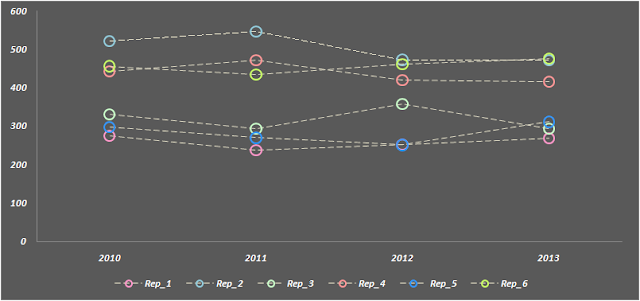
Download working File here
All you need to create a table with series name mentioned in cells and add color to cells next to it Snapshot below -

Download the sample file to know more.
Macro used to format the chart -
Sub format_chart()
Dim srs As Series
Dim cht As Chart
Set cht = Sheets("Sheet1").ChartObjects("Chart 1").Chart
For Each srs In cht.SeriesCollection ' remove exisiting series
'change marker color
srs.MarkerStyle = xlMarkerStyleCircle ' chnage style of marker
srs.MarkerSize = 10 ' size of marker
srs.MarkerBackgroundColorIndex = xlColorIndexNone ' fill color to none
' add circle color
srs.MarkerForegroundColor = Range("f" & Application.WorksheetFunction.Match(srs.Name, Sheets("Sheet1").Range("a:a"), 0)).Interior.Color
srs.Format.Line.Weight = 2 ' width of circle
srs.Format.Line.DashStyle = xlContinuous
' change line color
srs.Border.Color = Range("g" & Application.WorksheetFunction.Match(srs.Name, Sheets("Sheet1").Range("a:a"), 0)).Interior.Color
srs.Border.Weight = 2
srs.Border.LineStyle = xlDash
Next srs
End Sub

Download working File here
All you need to create a table with series name mentioned in cells and add color to cells next to it Snapshot below -
Download the sample file to know more.
Macro used to format the chart -
Sub format_chart()
Dim srs As Series
Dim cht As Chart
Set cht = Sheets("Sheet1").ChartObjects("Chart 1").Chart
For Each srs In cht.SeriesCollection ' remove exisiting series
'change marker color
srs.MarkerStyle = xlMarkerStyleCircle ' chnage style of marker
srs.MarkerSize = 10 ' size of marker
srs.MarkerBackgroundColorIndex = xlColorIndexNone ' fill color to none
' add circle color
srs.MarkerForegroundColor = Range("f" & Application.WorksheetFunction.Match(srs.Name, Sheets("Sheet1").Range("a:a"), 0)).Interior.Color
srs.Format.Line.Weight = 2 ' width of circle
srs.Format.Line.DashStyle = xlContinuous
' change line color
srs.Border.Color = Range("g" & Application.WorksheetFunction.Match(srs.Name, Sheets("Sheet1").Range("a:a"), 0)).Interior.Color
srs.Border.Weight = 2
srs.Border.LineStyle = xlDash
Next srs
End Sub


